ECDIS Route Monitoring and Alarms
An ECDIS alarm is only as good as the settings behind it. How the safety contour, the look-ahead cone, and cross-track limits keep the watch off the ground.
The unsettling thing about most ECDIS groundings is that the alarms were working. The screen was lit, the route was loaded, the system was monitoring exactly as designed, and the ship still drove onto the ground because the numbers behind those alarms had been set wrong, or barely set at all. ECDIS does not know your ship’s draft, your under-keel clearance, or how much water you actually need. It knows only what the watch officer tells it.
That is the central truth of route monitoring: the equipment does not keep you safe, the settings do, and the settings are your job. Get them right and ECDIS becomes the finest anti-grounding tool ever put on a bridge. Get them wrong and it becomes a convincing display that watches you run aground.
From Plan to Watch: What Route Monitoring Is
Route monitoring is the execution phase of a passage, the part that follows the planning and checking covered in the four stages of passage planning. Once a route is planned and verified, you activate it for monitoring, and from that moment ECDIS continuously compares the ship’s position against the active route and the surrounding chart. It shows your position on the leg, the next waypoint, your cross-track position within the corridor, and the water ahead, and it raises an alert whenever something needs your attention. In effect, it watches the plan so that you can keep the watch, freeing your eyes for the window and the radar while it minds the chart.
But it monitors against what you set, not against some universal idea of safety. Everything that follows, every alarm, every shaded area, every warning of danger ahead, is built on a small number of parameters the officer enters before the voyage. Understanding those parameters is the difference between monitoring that protects you and monitoring that merely reassures you. This is one of the most important skills in the wider practice of working with ECDIS, and it starts with two numbers.
Safety Contour and Safety Depth: The Settings Behind Every Alarm
The single most important setting in ECDIS is the safety contour. It is the line the system draws between safe and unsafe water for your ship, shading the unsafe side and, crucially, sounding an alarm whenever your look-ahead or your hull reaches it. Of all the safety parameters, the safety contour crossing is the one automatic audible alarm the IMO performance standards require ECDIS to generate for grounding risk. You set it from your deepest dynamic draft plus an allowance for under-keel clearance, squat, and heel, so that the contour represents the shallowest water you can safely enter.
Two traps live in this setting, and both have grounded ships. The first is leaving it unset: if you enter no value, ECDIS defaults to a safety contour of 30 meters, a figure far too deep for most ships and most waters, which floods the display with false unsafe water and trains the watch to ignore it. The second is subtler. If the exact depth you enter does not exist as a contour in the electronic chart, ECDIS does not invent it. It selects the next deeper contour available, so a value of 11 meters might be displayed as a 20 meter contour because that is the next one charted.
The boundary you are watching is then more conservative than you intended, and it can mean you must legitimately cross your own safety contour to enter a channel. You need to know this is happening so that the resulting alarm is expected rather than confusing.
The safety depth is often confused with the safety contour but does something quite different. It governs spot soundings only: soundings equal to or shallower than your safety depth are shown in bold, while deeper ones fade to grey, giving you an at-a-glance read of which charted depths to respect. That is all it does. The safety depth drives no alarm of its own. It is a display aid, not a guard, and treating it as protection is a dangerous mistake.
The Look-Ahead: The Anti-Grounding Cone
A line on the chart only helps if something is checking it against where you are going, and that something is the look-ahead, often called the anti-grounding cone or safety frame. It is the function that turns the safety contour from a static boundary into a forward-looking warning.
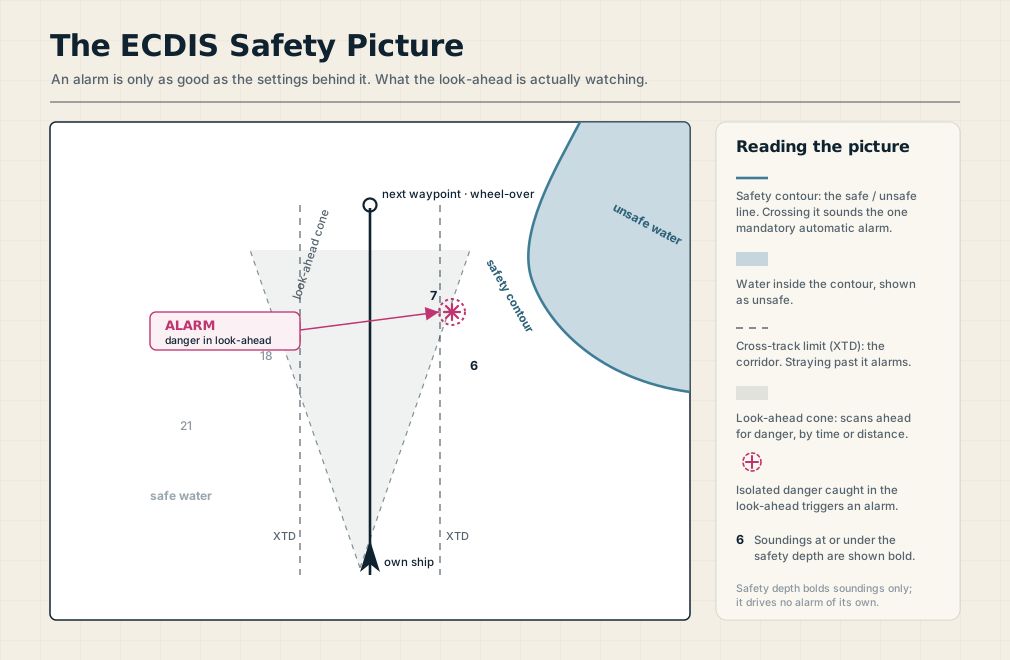
The look-ahead scans a sector of water ahead of the ship along the intended track, and it interrogates everything inside that sector: water shallower than your safety contour, isolated dangers such as wrecks and rocks, and areas with special conditions like prohibited zones. If your present course and speed would bring you into any of them within the time or distance you have set, ECDIS warns you before you arrive. Isolated dangers are flagged even when their chart layer is switched off, so a wreck cannot hide simply because the display is decluttered.
The one judgment the look-ahead demands is its range. Set it by the time or distance that gives you room to act at your current speed, longer in open water at full speed, shorter in confined waters where the next danger is always close. Set it too long and the cone reaches so far ahead that it alarms on everything, and a watch buried in alerts soon stops reading them, which is its own kind of blindness. The cone is only as useful as the discipline with which it is tuned.
Staying in the Corridor: Cross-Track, Course, and Wheel-Over
Alongside the anti-grounding picture, ECDIS watches your position along the route itself. Each leg carries a cross-track distance limit, the corridor on either side of the planned track that you set during planning according to the available sea room. Stray beyond it and ECDIS sounds a deviation alarm, telling you the ship is wandering wider than the plan allows, whether from a missed course adjustment, a strong set, or simple inattention.
The system also tracks your approach to each waypoint and the wheel-over point where the turn must begin. These approach alarms are useful, but the mark of a good watchkeeper is that the turn is never a surprise. You should be anticipating the wheel-over from the plan and the clock, with your hand already moving before the alarm confirms what you already knew. The alarm is a backstop for a turn you are flying, not a prompt to start thinking about one.
The Alert Hierarchy, and the Danger of Alarm Fatigue
Modern ECDIS sorts its alerts into a hierarchy, under the bridge alert management framework, of alarms, warnings, and cautions, in descending order of urgency. Alarms demand immediate action and acknowledgment, the safety contour crossing and a danger detected in the look-ahead among them. Warnings need attention but less urgently, and cautions are the lowest level of awareness.
Beyond the grounding alarms, the performance standards expect ECDIS to alert you to a deviation beyond cross-track limits, the approach to a waypoint or critical point, the failure or loss of the position-fixing system, a chart on a different geodetic datum, and the use of charts at the wrong scale or the availability of a better-scale chart for the area.
The great enemy of all this is alarm fatigue. An ECDIS set with careless parameters cries wolf constantly, and a watch officer who acknowledges alarm after alarm without reading them is training a reflex that will silence the one alarm that mattered. The answer is not to mute the system but to set it thoughtfully, so that an alarm is a rare event worth your full attention, and to treat every alarm as real until you have personally confirmed otherwise. Acknowledging an alarm is meant to mean you have understood and dealt with it, not that you have made the noise stop.
Trust but Verify: Position, Datum, and Display Traps
Every alarm ECDIS raises rests on one assumption: that it knows where the ship is. That position comes almost entirely from satellite navigation, and a system that trusts its position blindly will follow a wrong one straight into danger. Satellite positioning can be degraded, and deliberate jamming and spoofing of GNSS have become a real and growing hazard in several parts of the world, capable of placing your charted position somewhere the ship is not. ECDIS will alarm on a complete loss of position, but a subtly false position may raise no alarm at all.
The defense is old-fashioned and non-negotiable: verify the ECDIS position by independent means. Cross-check it against radar, overlay the radar picture on the chart and watch the coastline align, run parallel indexing on a charted feature, and take a visual bearing or a second position source when you can. Watch for the position that jumps, and confirm that chart and position share the same datum.
Two display traps deserve the same wariness. Running ECDIS in its base or standard display can hide the very dangers you need, so use the full display with spot soundings and isolated dangers shown when the situation demands it. And heed the overscale warning, because zooming a small-scale chart until it looks detailed does not add detail, it only magnifies ignorance, and a better-scale chart may be available for the area. In tidal port approaches, the safety contour itself can become unreliable, since the appropriate contour often does not exist in the data, and good practice there is to draw your own alarmable no-go areas on a user layer so the look-ahead has a real boundary to guard.
ECDIS Monitors; the Officer Navigates
For all its power, ECDIS is a monitoring tool, not a navigator. It executes the watch officer’s intentions and guards the watch officer’s boundaries, but it does not decide, anticipate, or keep a lookout. The alarms are a safety net beneath a plan you are actively flying, not a substitute for flying it, and the same principles of attention and anticipation that define good watchkeeping apply with the screen exactly as they do with the window.
The officer who sets the system well, verifies it constantly, and stays ahead of it has the best anti-grounding tool ever built. The officer who waits for it to beep has a very expensive way of finding out they ran aground.
Frequently Asked Questions
These are the questions watchkeepers and cadets ask most about ECDIS route monitoring, from the safety settings that drive the alarms to the discipline of using them well. Here are the short answers.
What is the difference between safety contour and safety depth?
The safety contour is the boundary between safe and unsafe water and is the setting that triggers the mandatory anti-grounding alarm when crossed or detected by the look-ahead. The safety depth only affects how spot soundings are displayed, showing those at or under it in bold, and it generates no alarm. The contour guards you; the depth simply highlights soundings.
Why does ECDIS sometimes use a deeper safety contour than I set?
Because ECDIS can only display contours that exist in the electronic chart. If the value you enter is not a charted contour, the system selects the next deeper one available, so your displayed boundary may be more conservative than intended. This is why you can be required to cross your own safety contour to enter shallower channels, and why you should always check which contour is actually shown.
What does the ECDIS look-ahead do?
The look-ahead, or anti-grounding cone, scans a sector ahead of the ship for water shallower than the safety contour, isolated dangers, and special areas, and warns you before you reach them within the time or distance you set. It is what turns the safety contour into a forward-looking alarm. Its range must be tuned to your speed and waters, since too long a setting floods the watch with alerts.
What is the only mandatory automatic audible alarm on ECDIS?
The safety contour crossing. It is the one automatic audible alarm the IMO performance standards require for grounding risk. Other protections, such as alarms on specific wrecks or obstructions, often depend on the officer setting them or on drawing alarmable no-go areas, which is why thoughtful configuration matters so much.
How do you avoid ECDIS alarm fatigue?
Set the safety parameters and look-ahead thoughtfully so that alarms are rare and meaningful rather than constant, and never acknowledge an alarm without understanding and addressing it. The goal is a system that alerts you only when something genuinely needs attention, so that the reflex you build is to respond, not to silence.